Key Differences Between Headless CMS vs Traditional CMS
Content management systems play a crucial role in website performance and user experience. Explore Headless CMS vs Traditional CMS to understand differences, features, pros, and cons, helping businesses choose the best platform for their digital strategy.
 Babar Al-Amin

Choosing the right content management system is crucial for any business looking to manage its website efficiently. With modern web development evolving rapidly, the debate between Headless CMS vs Traditional CMS has become more relevant than ever.
Traditional CMS platforms offer simplicity and ease of use, while headless CMS provides flexibility and scalability for developers. In this article, we’ll explore the differences, features, pros, and cons of both, helping you decide which solution best fits your business needs. Let’s dive in.
Key Takeaways
- Traditional CMS is simple, editor-friendly, and ideal for small websites or non-technical teams.
- Headless CMS provides flexibility, scalability, and omnichannel content delivery via API-driven architecture.
- Architecture, flexibility, scalability, security, and user experience are key factors in choosing a CMS.
- Businesses must balance ease of use with customization and long-term growth needs.
- Choosing the right CMS ensures efficient content management and consistent digital experiences across platforms.
What is a Traditional CMS?
A Traditional CMS (Content Management System) is a monolithic platform that integrates the content management backend with the frontend presentation layer. This means the same software that lets you create, edit, and store content also determines how that content appears on your website. Examples of popular traditional CMS platforms include WordPress, Drupal, and Joomla.
Key Characteristics of a Traditional CMS
- All‑in‑one architecture: The backend and frontend are tightly coupled, so content storage and display are part of the same system.
- Easy visual editing: Most traditional CMS platforms come with user‑friendly, WYSIWYG (What You See Is What You Get) editors, drag‑and‑drop tools, and templates, making them accessible even for non‑technical users.
- Predefined templates and plugins: These systems use built‑in themes and plugins to add functionality, which speeds up development but can limit flexibility.
- Primarily website‑focused: Traditional CMS platforms are designed mainly for publishing content on websites rather than across multiple digital channels.
What is a Headless CMS?
A Headless CMS is a modern content management system in which the content backend exists separately from the frontend presentation layer. Instead of tightly linking how content is stored with how it is displayed, a headless CMS stores content in a central repository and delivers it to any device or platform through APIs (Application Programming Interfaces).
Key Characteristics of a Headless CMS:
- Decoupled architecture: The backend (where content is created and managed) is separate from the frontend (how it’s displayed).
- API‑driven delivery: Content is sent through APIs, making it possible to publish to websites, mobile apps, smart devices, or other platforms simultaneously.
- Greater flexibility and customization: Developers aren’t limited by predefined templates — they can build custom front ends using modern tools and frameworks.
- Omnichannel support: A single content repository can serve multiple outputs, ensuring edits update everywhere instantly without duplication.
Key Differences Between Headless CMS vs Traditional CMS
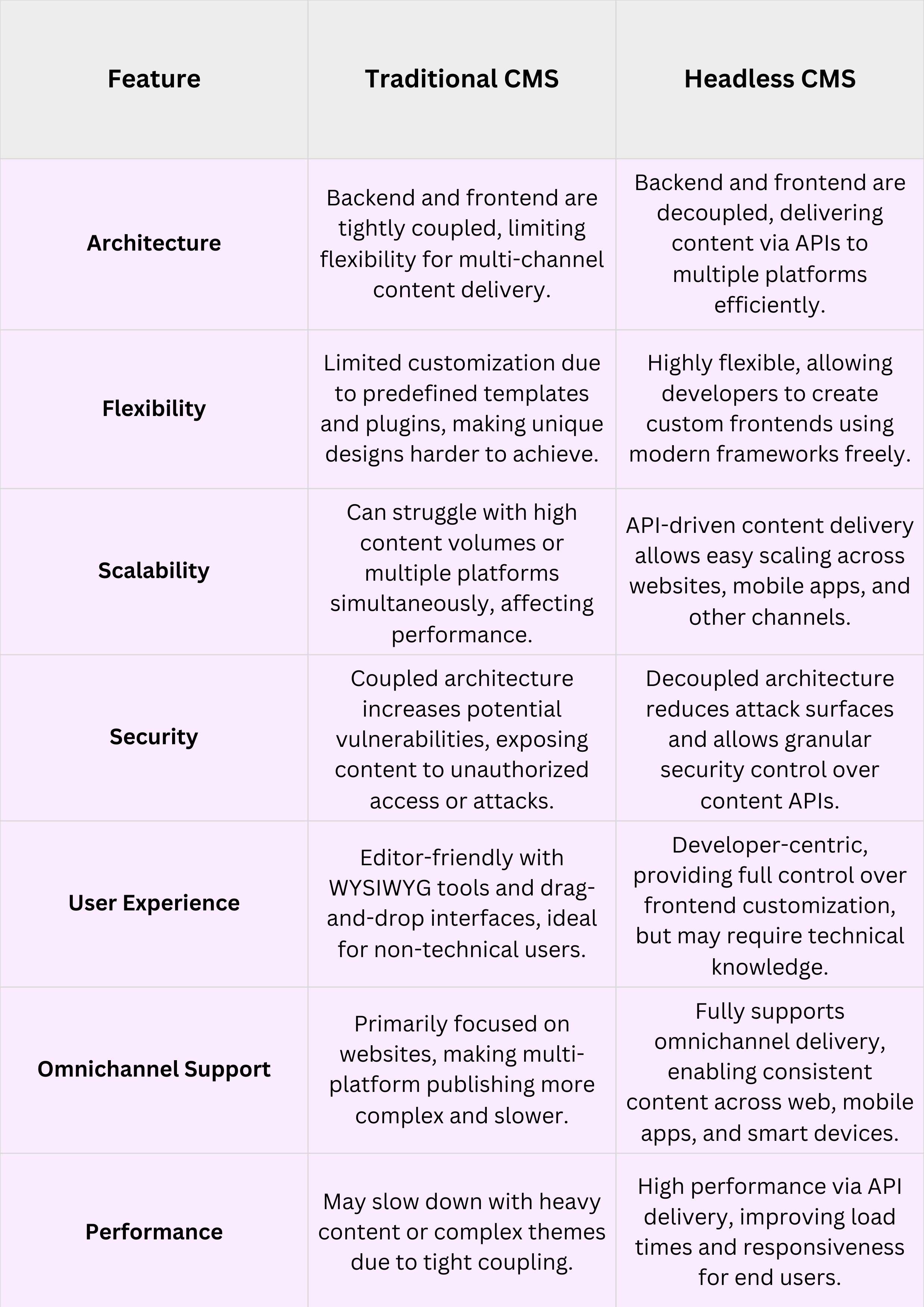
The differences between a headless CMS vs traditional CMS are crucial for businesses choosing a platform. Key factors such as architecture, flexibility, scalability, security, and user experience significantly influence this decision.
Architecture
A traditional CMS combines the backend and frontend into a single system, which can significantly limit content delivery flexibility. Headless CMS decouples content management from presentation, using APIs to distribute content seamlessly across multiple platforms and devices. This architecture allows businesses to scale their digital presence efficiently without relying on monolithic, rigid systems or predefined templates.
Flexibility
Traditional CMS platforms rely on templates and plugins, which restrict customization and significantly limit unique website design capabilities. A headless CMS gives developers full control to build custom frontends using modern frameworks while keeping content management separate. This flexibility ensures businesses can deliver tailored digital experiences across websites, mobile apps, and other omnichannel platforms effectively.
Scalability
Traditional CMS can struggle with high content volumes or delivering content simultaneously across multiple digital channels, reducing performance. In contrast, a headless CMS leverages API-driven content delivery, ensuring fast, reliable distribution to websites, mobile applications, and other platforms. This scalable approach makes a headless CMS suitable for growing businesses that efficiently and consistently manage large-scale omnichannel content strategies.
Security
In a traditional CMS, the coupled backend and frontend increase the risk of vulnerabilities, exposing websites to hacking and unauthorized access. A headless CMS separates content storage from presentation layers, reducing attack surfaces and enabling granular API security management. This structure provides a more secure environment for enterprises that handle sensitive content or maintain multiple digital channels simultaneously.
User Experience (Developers vs Editors)
Traditional CMSs focus on editors, providing WYSIWYG editors, drag-and-drop tools, and templates to simplify content creation and management. Headless CMS is more developer-centric, requiring technical expertise to build frontends while providing full freedom to customize digital experiences. Choosing between these systems depends on whether a business prioritizes editor simplicity or advanced developer control over presentation.
Traditional CMS vs Headless CMS – Pros and Cons
Understanding the pros and cons of traditional and headless CMS helps businesses choose the right content management platform.
Pros of Traditional CMS
- Easy-to-use WYSIWYG editor allows non-technical users to create and manage content efficiently without coding skills.
- The drag-and-drop interface simplifies website building and content layout adjustments.
- Predefined templates and plugins accelerate development, reducing time-to-launch for simple websites.
- Suitable for blogs, business websites, and projects that require fast setup and minimal technical expertise.
Cons of Traditional CMS
- Limited flexibility due to a tightly coupled backend and frontend, restricting custom design possibilities.
- Scalability challenges arise when handling large content volumes or multiple channels simultaneously.
- Security vulnerabilities may be higher due to a monolithic architecture exposing more attack surfaces.
- Multi-channel content delivery is difficult, making it less suitable for omnichannel publishing strategies.
Pros of Headless CMS
- A decoupled architecture enables developers to deliver content across websites, mobile apps, and other platforms with ease.
- API-driven content delivery ensures scalability and high performance even with large content volumes.
- Full frontend customization enables unique user experiences using modern frameworks and technologies.
- Omnichannel support allows consistent content updates across multiple platforms simultaneously.
Cons of Headless CMS
- Requires technical knowledge to build and manage custom frontends effectively.
- Editors may need additional tools to preview content properly before publishing.
- Initial setup and integration may take longer compared to traditional CMS platforms.
- Less editor-friendly, which can slow content creation for non-technical team members.
Headless vs Traditional CMS: Which Should You Choose?
Choosing between a headless CMS and a traditional CMS depends on your business goals, technical capabilities, and content needs. Traditional CMS is ideal for smaller websites or businesses that prioritize simplicity, quick setup, and editor-friendly interfaces.
It allows non-technical users to manage content efficiently using WYSIWYG editors, drag-and-drop tools, and ready-made templates. Headless CMS is better suited for organizations requiring scalability, omnichannel content delivery, and full frontend customization for digital experiences.
Developers can use modern frameworks to create highly interactive websites, mobile applications, and consistent content across multiple platforms. If your team has limited technical expertise, traditional CMS may be the practical choice for immediate content management needs.
For companies planning growth, global content distribution, or complex omnichannel strategies, headless CMS offers long-term flexibility and control. Ultimately, the decision should align with your organization’s priorities, balancing ease of use, customization, scalability, and content delivery requirements.
FAQs
Which CMS is better for small businesses, headless or traditional?
Traditional CMS is generally better for small businesses because it offers simplicity, ready-made templates, and WYSIWYG editors. It allows non-technical teams to manage content efficiently without requiring advanced technical skills or complex setup.
Can headless CMS work for omnichannel content delivery?
Yes, headless CMS is designed for omnichannel delivery. It allows content to be published simultaneously across websites, mobile apps, and other platforms, ensuring a consistent user experience. Its API-driven approach makes scaling and integration across channels much easier than traditional CMS.
Conclusion
Choosing the right system depends on your business goals and technical capabilities. Headless CMS vs Traditional CMS: Each offers unique advantages. Traditional CMSs are simpler and editor-friendly, while headless CMSs offer greater flexibility, scalability, and omnichannel support. Understanding these differences helps businesses select the platform that best balances ease of use, customization, and future growth needs.