TypeScript vs JavaScript: Key Differences
TypeScript vs JavaScript differences highlight how typing, tooling, and scalability affect development choices. Compare features, pros, cons, and use cases to understand when JavaScript fits rapid projects and when TypeScript delivers safer, maintainable solutions for growing applications.
 Babar Al-Amin

JavaScript powers modern web development, enabling interactive websites, dynamic applications, and scalable server-side solutions worldwide. As projects grow larger, developers often face challenges with debugging, maintenance, and long-term code reliability. TypeScript was introduced to address these issues by adding optional static typing to JavaScript.
Understanding typescript vs javascript differences is essential when deciding how to structure, scale, and maintain applications. In this guide, we will explain core distinctions, practical benefits, and real-world use cases to help teams choose the right language.
Key Takeaways
- TypeScript and JavaScript share the same core syntax and ecosystem.
- JavaScript is best for small projects, quick scripts, and rapid prototyping.
- TypeScript adds optional static typing to reduce runtime errors.
- TypeScript improves code readability and long-term maintainability.
- Strong IDE support makes TypeScript ideal for team-based development.
- employs static typing to define variable types at compile time
What Is JavaScript?
JavaScript is a high-level, interpreted programming language that powers interactive behavior on modern websites. It runs natively in web browsers and enables dynamic content such as animations, form validation, and real-time updates. JavaScript uses dynamic typing, meaning variable types are determined at runtime rather than in advance.
Beyond the browser, JavaScript is widely used on the server through environments like Node.js. Its flexibility, massive ecosystem, and low learning curve make it a popular choice for beginners and rapid development. However, as applications grow larger, JavaScript’s lack of built-in type safety can lead to runtime errors and maintenance challenges.
What Is TypeScript?
TypeScript is a statically typed superset of JavaScript developed and maintained by Microsoft. It adds optional type annotations, interfaces, generics, and advanced language features. All valid JavaScript code works inside TypeScript without modification. TypeScript code must be compiled into standard JavaScript before running in browsers or Node.js.
Unlike JavaScript, TypeScript employs static typing to define variable types at compile time. This approach helps detect errors early during development. It improves code reliability, especially in large and complex applications. TypeScript also enhances IDE support with autocompletion, refactoring, and real-time error checking. It is widely used with Angular, React, and Node.js for scalable applications.
TypeScript vs JavaScript: Key Differences
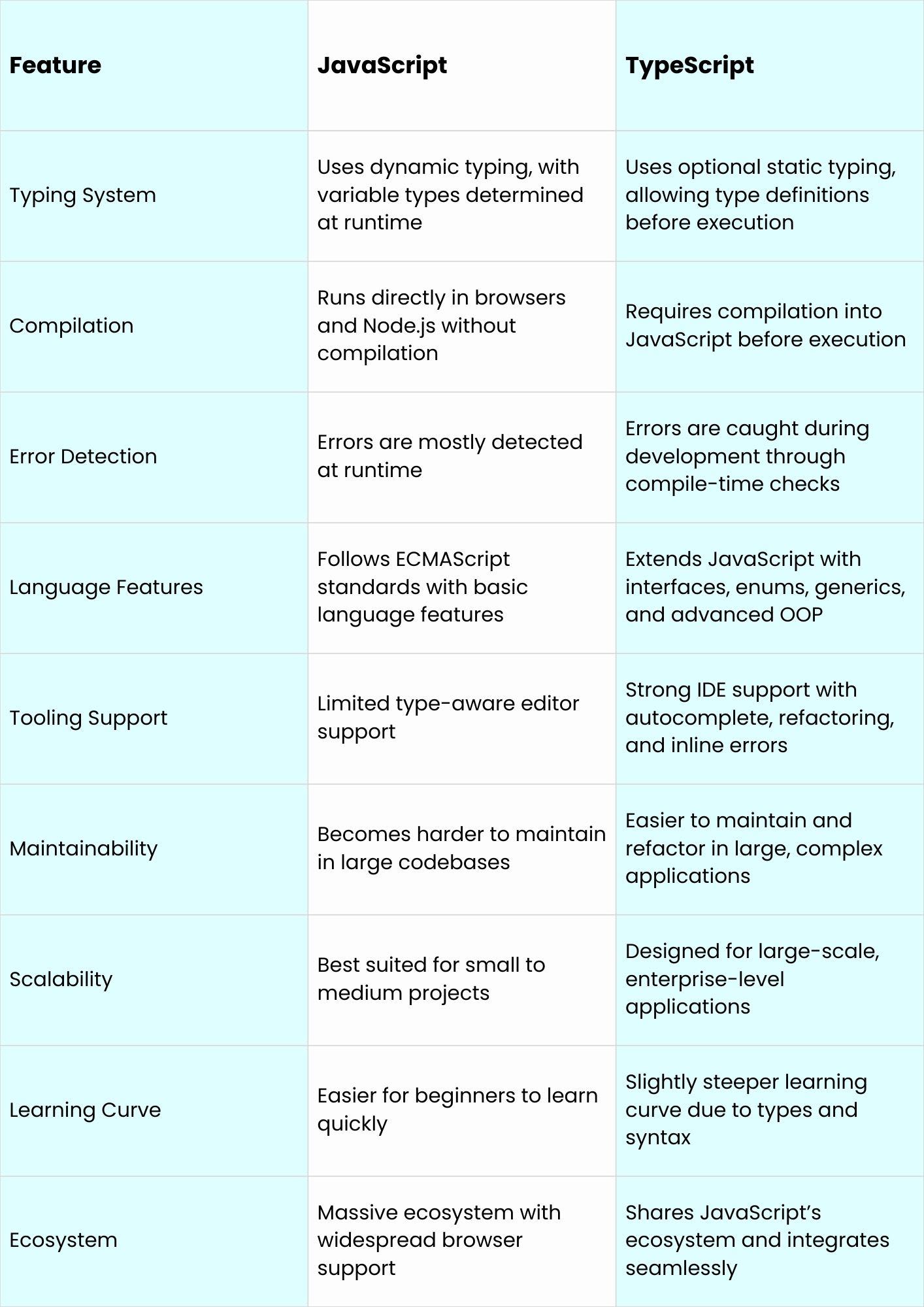
TypeScript and JavaScript share foundations, but differ significantly in typing, tooling, scalability, maintainability, and workflows for modern development teams today.
Typing System
JavaScript uses dynamic typing, allowing variables to change types at runtime without restrictions. This flexibility speeds development but increases runtime errors. TypeScript introduces optional static typing, enabling explicit type definitions. Static types improve readability, catch errors during compilation, and make large codebases safer and easier to manage collaboratively for teams.
Compilation vs Interpretation
JavaScript is interpreted and executed directly by browsers or runtime environments like Node.js. It requires no build step. TypeScript must be compiled into JavaScript before execution. This compilation process adds type checking and error validation, improving reliability, but introduces an additional step into development workflows for developers and larger projects.
Language Features
JavaScript follows ECMAScript standards and offers core programming features without enforced structure. TypeScript extends JavaScript with interfaces, enums, generics, and advanced object-oriented features. These additions help model complex systems more clearly, enforce contracts within code, and support safer abstraction in enterprise-scale applications used widely across modern large software projects today.
Tooling & Developer Experience
JavaScript offers broad editor support, but limited type-aware assistance. TypeScript significantly improves developer experience through intelligent autocomplete, inline documentation, and real-time error detection. IDEs can refactor code safely and predict behavior accurately. These features reduce bugs, speed development, and improve collaboration across growing teams working on complex shared codebases together.
Maintainability & Scalability
JavaScript works well for small projects and rapid prototypes with minimal overhead. As applications grow, maintaining consistency becomes harder. TypeScript improves maintainability by enforcing types and structure. This makes refactoring safer, reduces long-term technical debt, and supports scalable development across large teams and evolving systems in professional production environments today.
Community & Ecosystem
JavaScript has one of the largest developer communities and ecosystems worldwide. It powers countless libraries, frameworks, and platforms. TypeScript benefits directly from this ecosystem because it builds on JavaScript. Its adoption is rapidly growing, with strong support across modern frameworks and enterprise development environments used by startups and global organizations.
Advantages of TypeScript
- Provides optional static typing for early error detection.
- Improves code readability and long-term maintainability.
- Enhances IDE support with autocomplete and refactoring.
- Reduces runtime errors in large applications.
- Scales well for enterprise and team-based projects.
Disadvantages of TypeScript
- Requires a compilation step before execution.
- Has a steeper learning curve for beginners.
- Adds initial setup and configuration overhead.
- Slower for quick prototypes or small scripts.
Advantages of JavaScript
- Runs directly in browsers without compilation.
- Easy to learn and beginner-friendly.
- Supports rapid development and prototyping.
- Massive ecosystem and community support.
- Works across all modern platforms by default.
Disadvantages of JavaScript
- Lacks built-in static typing and type safety.
- Errors are often discovered at runtime.
- Harder to maintain as projects grow larger.
- Refactoring large codebases can be risky.
When to Use TypeScript vs JavaScript
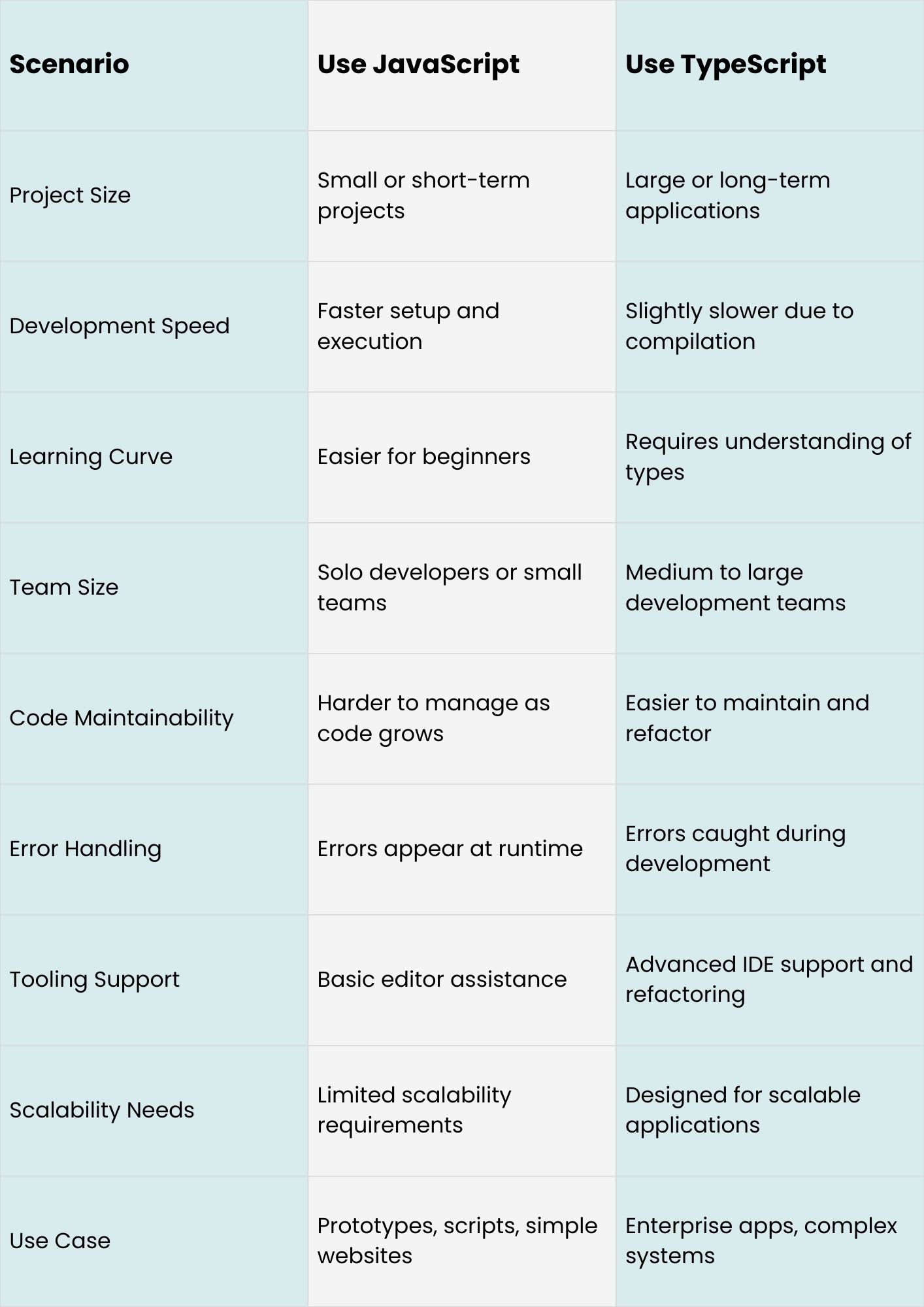
Choosing between TypeScript and JavaScript depends on your project size, team, and long-term goals. Both languages are powerful, but each fits different development needs.
Use JavaScript When
- You need rapid prototyping or quick scripts.
- The project is small or short-term.
- You want minimal setup and immediate execution.
- The team is small or consists of beginners.
- You prioritize speed and flexibility over strict structure.
Use TypeScript When
- You’re building large-scale or enterprise applications.
- The project requires long-term maintenance and scalability.
- You work in a team where code consistency matters.
- You want better error detection during development.
- You need strong tooling support for refactoring and documentation.
Is TypeScript better than JavaScript?
Whether TypeScript is better than JavaScript depends on your goals and project needs. TypeScript adds optional static typing, which helps catch errors early, improves code maintainability, and enhances tooling support. It makes a strong choice for large, complex applications with team development.
In contrast, JavaScript is more flexible, runs without a compile step, and suits smaller projects or rapid prototyping. For enterprise-scale apps, TypeScript often improves reliability. For quick scripts or simple sites, JavaScript remains practical.
Want Professional Help with TypeScript and JavaScript Projects?
Looking for expert development support that understands TypeScript vs JavaScript differences and builds solutions that truly work? WorkersLab is a boutique web development studio known for modern, reliable apps and clean code that scales with your business needs.
We focus on practical development using proven technologies without unnecessary complexity. With real developers, you get honest guidance on tech choices like JavaScript or TypeScript based on your goals. Contact us today to get a custom quote and start your project with confidence.
Conclusion
Choosing between TypeScript and JavaScript depends on project size, team needs, and long-term goals. JavaScript is ideal for quick prototyping and small projects because it runs immediately and is easy to learn.
TypeScript adds static typing, better tooling, and improved maintainability, making it the best choice for large-scale, enterprise applications. By understanding TypeScript vs JavaScript differences, you can select the right language for your development goals.